
- Store
BD/DVD
Video
Mobile
- Windows Software
- iPhone Data Recovery
- iPhone Transfer
- Mac software
- iPhone Data Recovery for Mac
- iPhone Manager for Mac
PDF
- Windows Software
- PDF Converter Ultimate
- Mac software
- PDF Converter for Mac
Freeware
- Support
Convert DVD movies and video to any popular SD and HD video formats like MP4, MOV, M4V, AVI, WMV, MKV, FLV, Xvid, DivX, and audio formats like MP3, AAC, AC3, and so on.
iCoolsoft DVD Converter for Mac is designed for Mac OS X users, which can help Mac users to rip movies from all sorts of DVD discs, and convert DVD/Video to all popular video/audio formats for your diverse uses.
This tool can convert DVD movie and video to HD videos and general videos in AVI, MOV, AVI, MPEG, MPG, WMV, DivX, Xvid, MOV, FLV, and other formats, extract DVD/Video audio track to popular audio files in MP3, AAC, WMA, AC3, WAV, AIFF, OGG, FLAC, etc on Mac.
This Mac DVD Converter can list all the DVD movie titles and chapters for you to choose any one to convert. You are also allowed to choose the subtitle and audio track. You can select any movie chapter, preview it and quickly save your favorite scene as image files.

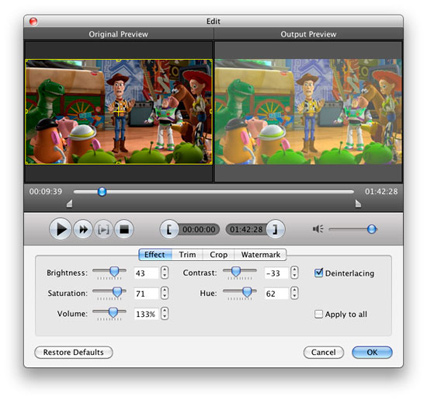
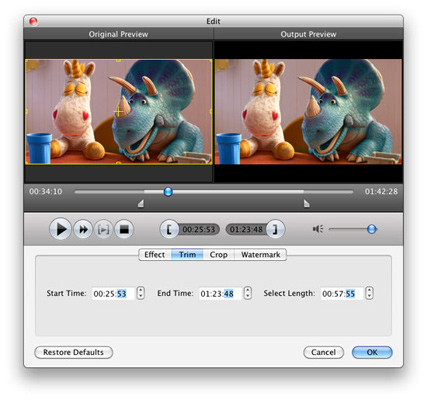
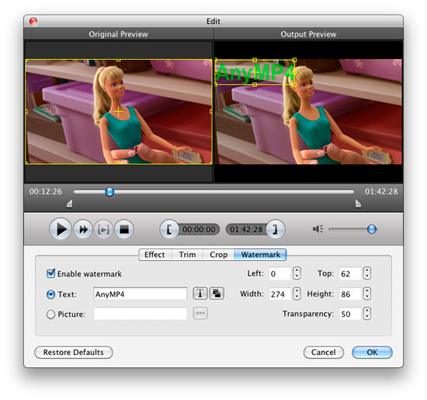
This DVD + Video Converter can help you trim video to cut unwanted parts, merge several clips into one video, crop video playing region, adjust video effect, add text/image watermark to video, and so on.
No matter what output format you choose, you can adjust the image and sound quality by setting Video Encoder, Resolution, Frame Rate, Video Bitrate, Audio Encoder, Sample Rate, Channels, Audio Bitrate, etc.
You can use it to directly get videos optimized for iPhone, iPad, iPod, Apple TV, Samsung Galaxy, PSP, PS3, Xbox 360, Zune, iRiver, Creative Zen, Archos, BlackBerry, mobile phones and other devices.
With DVD Converter Mac, you can take snapshot when you preview. The pictures can be saved in a default folder. This Mac DVD Converting provides you with intuitive interface and advanced acceleration technology, which makes your conversion much easier and completed the whole conversion in a short while.

| DVD | DVD Disc, DVD Folder, DVD IFO Files |
|---|---|
| Video | Standard video formats: MPG, MPEG-1, MPEG-2, MPEG-4, MJPEG, VOB, DAT, MP4, DivX, Xvid, M4V, TS, MTS, M2TS, RM, RMVB, WMV, ASF, MKV, AVI, 3GP, 3G2, F4V, FLV, SWF, MPV, MOD, TOD, QT, MOV, DV, DIF, MJPG, MJPEG, TP, TRP, WebM HD video formats: MTS, TS, M2TS, HD AVI, HD MP4, HD WMV, HD MPG, HD MOV, QuickTime HD MOV, TP, TRP |
| Audio | Standard audio formats: MP3, MP2, AAC, AC3, WAV, WMA, M4A, RM, RAM, OGG, AU, AIF, AIFF, APE, FLAC, CUE |
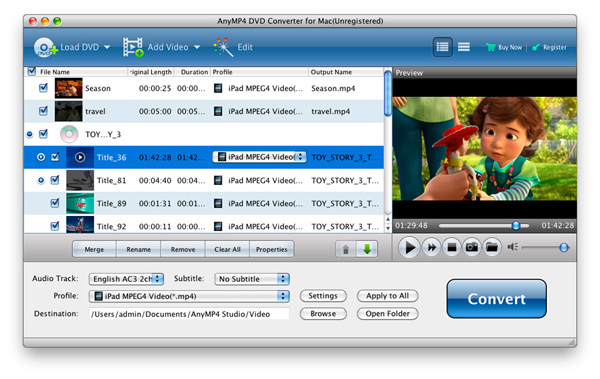
The comprehensive Video Converter to convert video/DVD to HD/3D videos and audio formats, download and convert online videos like YouTube.
Learn More >>
Convert MTS videos to any popular formats, such as MP4, MOV, AVI, MKV, WMV, FLV, HD MOV, HD AVI, HD MP4, etc. on Mac OS.
Learn More >>
The best Blu-ray media player for Mac users to play Blu-ray disc, Blu-ray Folder, Blu-ray ISO image files and 1080p HD videos on Mac.
Learn More >>