



How to convert Blu-ray movie to AVI format?
Blu-ray Video:Blu-ray (not Blue-ray) also known as Blu-ray Disc (BD), is the name of a new optical disc format jointly developed by the Blu-ray Disc Association (BDA), a group of the world's leading consumer electronics, personal computer and media manufacturers (including Apple, Dell, Hitachi, HP, JVC, LG, Mitsubishi, Panasonic, Pioneer, Philips, Samsung, Sharp, Sony, TDK and Thomson). The format was developed to enable recording, rewriting and playback of high-definition video (HD), as well as storing large amounts of data. The format offers more than five times the storage capacity of traditional DVDs and can hold up to 25GB on a single-layer disc and 50GB on a dual-layer disc. This extra capacity combined with the use of advanced video and audio codecs will offer consumers an unprecedented HD experience.
1. Download iCoolsoft Blu-ray Video Converter and install it in your PC.
2. Click "Load Blu-ray" button to load Blu-ray playlist or Blu-ray file.
Tip: If what you have loaded is Blu-ray playlist, then you can find a "Blu-ray File" button next to "Properties" button. Click that and the loaded file will be changed to Blu-ray file mode. Vice versa, if what you have loaded is Blu-ray file, then you will find a "Blu-ray Playlist" button next to "Properties" button. Click that and the loaded file will be changed to Blu-ray Playlist mode.
3. You can preview the Blu-ray file in the preview pane. If you like some scene of the movie very much and want to save it, you can click the "Camera" button to take snapshot of it. Click the button next to the "Camera" button and you can find the picture snapped.
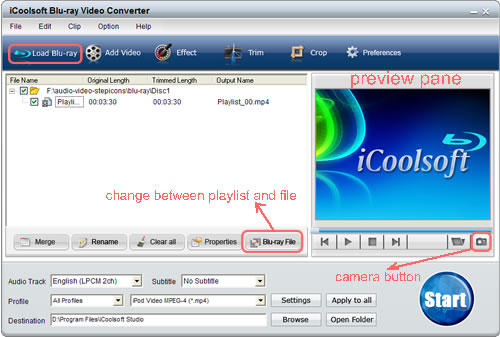
4. The converter provides us some edit functions as well.
If you only need a part of the entire file, you can use the "Trim" function to get the part you need exactly.
Click button "Effect" then you can adjust the Brightness, Contrast, and Saturation.
With the function of "Crop", there is "Zoom Mode" for you to select the Aspect Ratio, including 16:9, 4:3, full screen, and keep original. That function also can help you to zoom in some part of the video image.
Watermark function helps us to add text or picture watermark. You can adjust the location, transparency, size, color, font, etc. as you like.
5. Click "Settings" button and you can set the Resolution, Frame Rate, Video Bitrate, Sample Rate, Channels, Audio Bitrate. As for the Resolution, you can even input your own one if you can not find a proper one from the given list.
6. From the "Profile" drop-down list, select AVI as the output format.
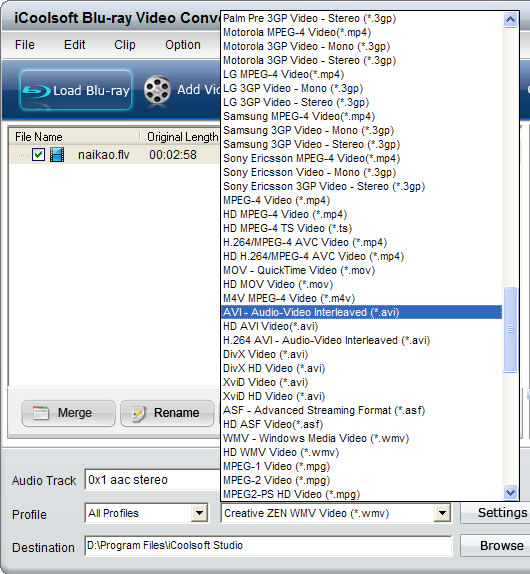
7. Set the destination and click "Start" button to start the conversion.
