



How to Convert TS File for Apple TV on Mac?
You may have shot a couple of videos in the MPEG-2 TS formats with your camcorder, and you want to upload these videos to Apple TV to share with friends. You need a professional video converter to convert TS videos to Apple TV on Mac. We recommend you iCoolsoft Apple TV Converter for Mac which can convert TS files to Apple compatible format on MAC with perfect output quality and high conversion speed for Mac users.
iCoolsoft Apple TV Converter for Mac enables you to convert most HD videos and general videos to Apple TV MPEG-4 and H.264 videos, and convert audio files to MP3, AAC, M4A format for playback on Apple TV.
First of all, free download iCoolsoft Apple TV Converter for Mac. Install and launch it.
Secondly, click "Add Video" button to add TS file.
Tip: You can preview the TS file in the preview pane and take snapshot by clicking "Camera" icon button.
.jpg)
Thirdly, you can click button "Effect", "Trim", or "Crop" to adjust effect, trim clips, crop displaying area, and add text/picture watermark.
.jpg)
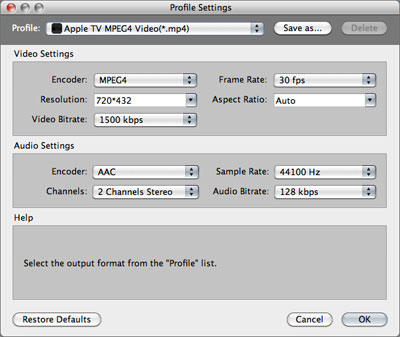
Fourthly, select Apple TV format from the drop-down list of "Profile".
Tip: Set output parameters, including Resolution, Frame Rate, Video Bitrate, Sample, Channels, and Audio Bitrate.
Lastly, set the destination and click button "Convert" to start converting TS file to Apple TV compatible format.
