


How to Download YouTube Videos?
- Why we need to download the YouTube videos?
When we come across some awesome videos on the Youtube,we just watch them and ignore them or want to save them in the computer?Nowadays,more and more people want to save their most interesting moment in pc and Mac.And some people want to share their important envet with friends and family menbers.You can download the most interesting videos to the pc.Do you know what the format of the YouTube videos?You can download the videos without knowing what the format of the videos on the YouTube with the help of our downloader-iCoolsoft Free YouTube Downloader.
Step by step guid to free download the YouTube downloader
1. Free download iCoolsoft Free YouTube Downloader and install it in your computer. Launch it after the installation.
2. Click  button and paste the YouTube video's URL into the popped out window.
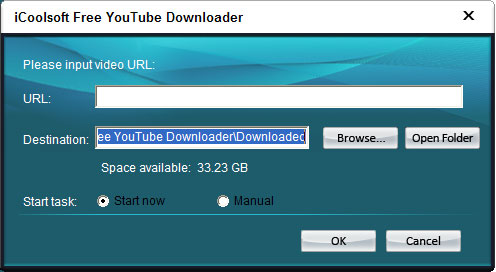
3. Set the Destination by clicking  button.
4. Select "Start now", the download task will start automatically right after you click the "OK" button. If you select "Manual", then the download task will be listed in the file list and you can start it by clicking  button anytime you like.
5. Click button "OK". Then you can wait for a while until the downloading is finished. Or you can choose to start, pause, stop, or remove download task in the main window.
Tip 1:
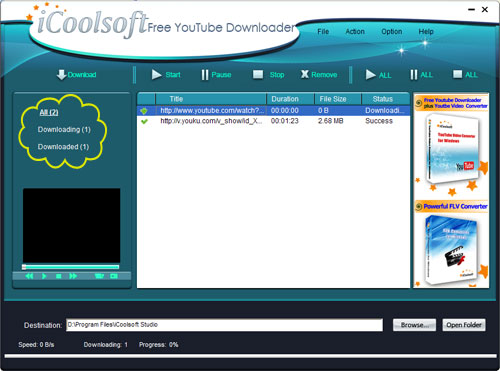
Select "All", "Downloading", or "Downloaded" from the left side of the window, and you can see from the file list all the files, the downloading files, or the downloaded files.
Tip 2:
You can preview the downloaded files in the preview pane. Select a file and click  button. While previewing, you can also take snapshot of the scenes you like by clicking
  button.
Tip 3:
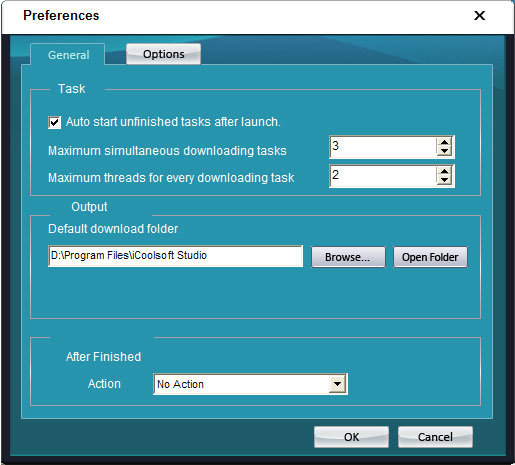
Click "Option" and then "Preferences", the "Preferences" window will show up. You can set the "Maximum simultaneous downloading tasks" and so on there.