



How to Convert VOB to AVI on Mac OS X?
Want to convert VOB to AVI on Mac? iCoolsoft VOB Converter for Mac is such an VOB to AVI Mac Converter that can convert VOB to WMV on MAC with perfect output quality and high conversion speed for Mac users. It is a useful and convenient tool for you to convert VOB to AVI MAC. With the help of iCoolsoft VOB Converter for Mac, you can convert VOB to AVI Mac easily.
With it, you can also extract audio tracks from videos and convert it to any popular audio formats like MP3, AAC, M4A, etc. What's more, you customize your video by trimming, merging, cropping, and adding special effects.
Step-by-step Guide about How to Convert VOB to AVI
Free download iCoolsoft VOB Converter for Mac.
Step 1: Install and launch iCoolsoft VOB Converter for Mac.
Step 2: Click "Add Video" button to add VOB files to this program. You can preview them in the preview pane and take snapshot of the scenes you like.
.jpg)
Step 3: Adjust effect, trim clips, crop displaying area, and add text/picture watermark if you like.
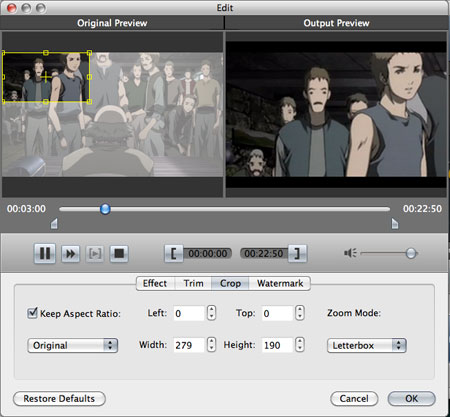
Step 4: Set the output format as AVI from the drop-down list of "Profile". Set other parameters by clicking button "Settings".
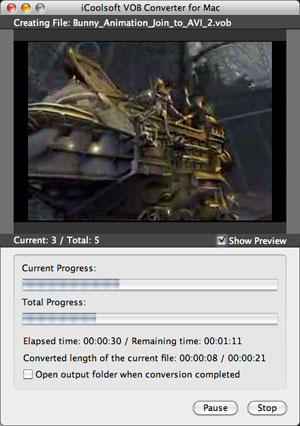
Step 5: Set the destination and click button "Convert" to start the conversion.
Related articles:
How to Convert MOD Files to VOB Format?
How to Convert VOB Files to 3GP Format?
How to Convert VOB to iTunes MP4/MOV Format?
How to Convert VOB Video to MP4 Format?
How to Convert VOB Files to MPEG Format?
How to Convert VOB Video to QuickTime MOV Format?
How to Convert VOB to YouTube FLV Format?
How to Convert MTS to VOB Format?
